
Your USB drive appears in Windows, but its folders are missing, replaced by shortcuts, or impossible to open. These symptoms can follow a malware infection, although file-system corruption can cause similar problems. To recover data from a pendrive after a virus attack, first determine whether the files are hidden, deleted, corrupted, or encrypted. The right approach can restore access without putting the remaining data at risk.
Can You Recover Files From a Virus-Infected USB Drive?
Often, yes. Shortcut malware may hide folders and create .lnk files that resemble them. Other infections can delete files, damage file-system records, or encrypt data. Hidden files may only need to be made visible; deleted or corrupted files may need recovery software. Ransomware-encrypted files require a suitable decryptor or backup.
To investigate, right-click the USB drive in File Explorer, select Properties, and check Used space. Then press Win + X > Disk Management to check its capacity and file system. High used space with apparently empty folders can suggest hidden files; RAW means Windows cannot recognize the file system. Neither observation proves malware caused the problem. Your chances of recovering files from a virus-infected USB drive depend on overwriting, damage, and encryption.
What to Do Before Recovering Data From an Infected USB
- Do not copy new files onto the drive, format it, or accept Windows’ offer to repair it. Avoid running chkdsk /f before securing important data. These operations can change file-system structures.
- Do not open unfamiliar .lnk, .exe, or .bat A shortcut that looks like a normal folder may execute malicious code.
- Leave real-time antivirus protection enabled and check the host computer for infection. Malware on a USB does not always mean that the computer is infected.
- Create a disk image when possible. Tools such as Disk Drill can create a byte-to-byte backup of readable sectors, allowing recovery attempts to run against an image rather than the original device. If the USB disconnects repeatedly or/and is physically unstable, seek professional help.
When feasible, preserve the drive before initiating antivirus cleanup because quarantine and deletion can modify its contents.
How to Recover Data From Pendrive After Virus Attack
Start with the least invasive method that matches the problem. Hidden files may need only a visibility change, while deleted files and damaged file systems require specialized recovery tools.
Method 1. Show Hidden Files Using File Explorer
Best for: USB drives that open normally but appear to have missing folders.
Windows may simply be hiding files whose attributes were changed by malware.
- Open File Explorer and select the USB drive under This PC.
- Click View > Show > Hidden items.
- Enable View > Show > File name extensions to help distinguish real folders from suspicious .lnk shortcuts.
- Check whether the original folders appear. Avoid opening suspicious files.
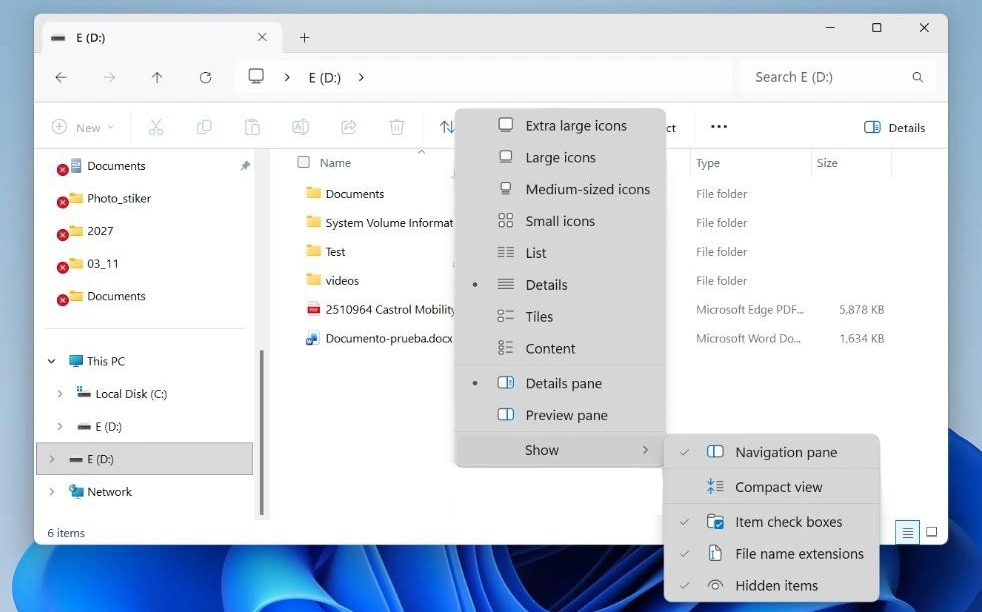
If the files become visible, copy the needed documents to a separate location and scan them before opening.
This method can help recover hidden files from a USB drive in the sense of restoring access, but it does not restore files that have actually been deleted. If nothing appears, the files may also have the System attribute set. Continue with Method 2.
Method 2. Recover Hidden Files Using CMD
Best for: Files hidden through their Hidden or System attributes.
The Windows attrib command can remove these attributes. However, it modifies file metadata, so preserve important data first whenever possible.
- Confirm the drive letter, such as E:, in File Explorer.
- Open Command Prompt and enter dir E:\ /a to inspect hidden entries in the USB’s root directory.
- If the expected files or folders appear, create a backup or disk image before changing their attributes. Then enter: attrib -h -r -s /s /d E:\*.*, replacing E: with the correct letter.
- Check File Explorer again. Do not open suspicious shortcuts or executables.
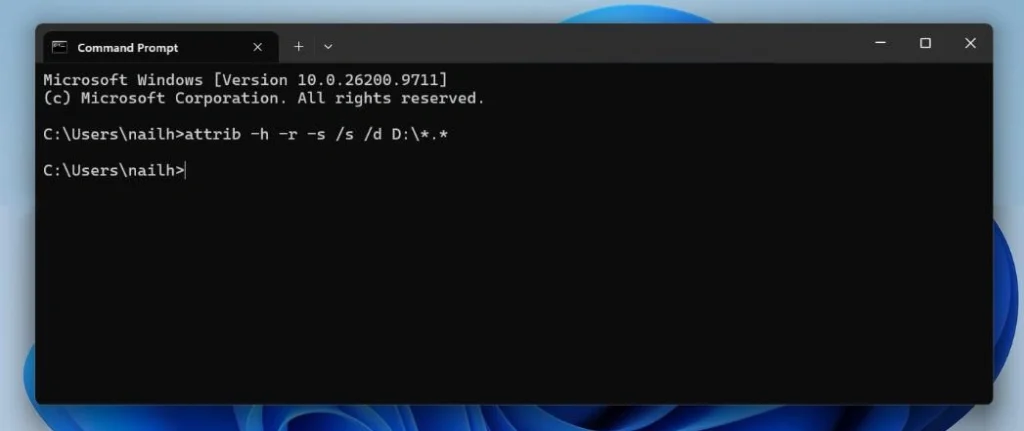
In this command, -h clears Hidden, -r clears Read-only, and -s clears System. /s covers subfolders and /d includes directories.
Important: This command changes attributes across the selected USB drive, including potentially malicious files. It does not remove malware or restore deleted data.
Method 3. Recover Deleted Files Using Data Recovery Software
Best for: Files deleted by malware or missing after other methods fail.
When a file is deleted, its data may remain in the flash drive’s storage until the relevant space is reused or cleared. USB flash drive data recovery software can search for this remaining content.
A USB recovery program such as Disk Drill can search for deleted files and data on damaged volumes. Its advantages include multiple scanning methods, byte-to-byte backups, and file previews that help users check results before recovery.
Follow these steps:
- Download and install Disk Drill from its official website and install it on your computer, not on the affected USB.
- Select the USB in Disk Drill, or attach a previously created byte-to-byte image.
- Click Search for lost data. Choose Universal Scan if Disk Drill prompts you to select a recovery method.
- Click Review found items. Look in Deleted or lost for files whose original metadata may remain, and Reconstructed for files identified by their contents. Reconstructed files may have generic names because their original file-system records are missing.
- Use file-type filters to identify the needed files and preview them.
- Select the files, click Recover, and choose a different physical drive as the destination.
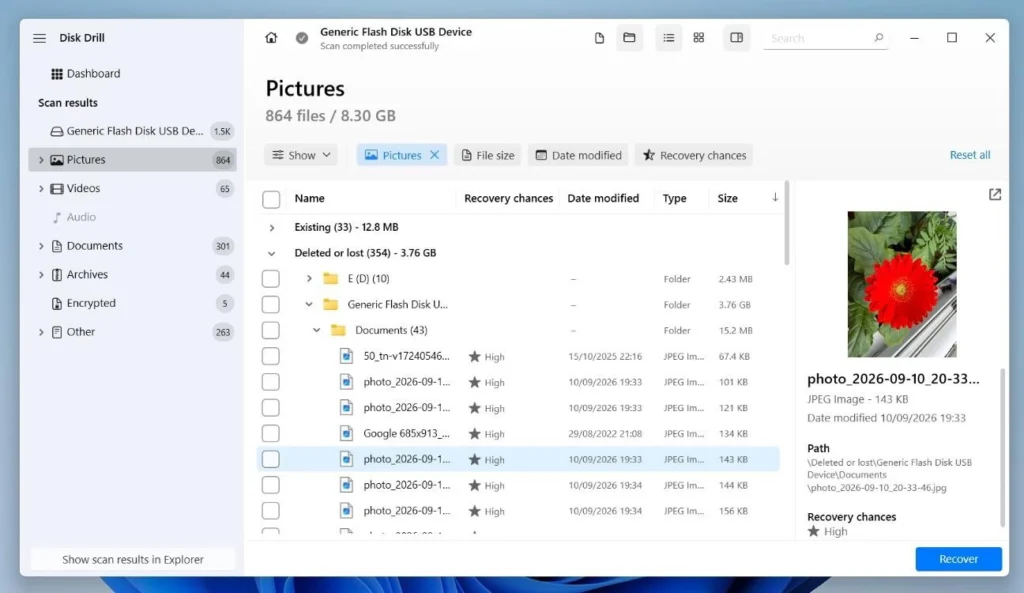
Disk Drill for Windows offers 100 MB of free recovery and free scanning and previewing; larger recoveries require a paid license. Microsoft’s free Windows File Recovery is a command-line alternative; use Extensive mode for FAT32 or exFAT media. Scan recovered files before opening them, especially executables and macro-enabled documents.
Method 4. Recover Files From a Corrupted USB Drive
Best for: Corrupted USB drive recovery may be necessary when a drive appears as RAW, cannot be opened, or prompts Windows to format it. These symptoms can also indicate hardware problems.
- In Disk Management, check that the USB shows its expected capacity. Do not format or initialize it.
- If it reads reliably, create a byte-to-byte image on another drive.
- Scan the image with software that supports damaged file systems and file-signature recovery.
- Preview recovered files and save them somewhere else.
USB corruption can make directory records inaccessible while some file contents remain readable. Recovered files may lose their names or folder structure. If the device disconnects repeatedly or has the wrong capacity, stop and seek professional help. A BitLocker To Go-encrypted USB still requires its password or recovery key.
How to Remove USB Malware and Prevent Future Infections
Once important files are preserved, scan the infected drive:
- Open Windows Security > Virus & threat protection.
- Select Scan options > Custom scan > Scan now.
- Choose the USB drive and allow the scan to complete.
- Review detections and follow the recommended actions. Antivirus tools may quarantine or delete infected files.
- Scan the computer and recovered files before opening.
After recovery and containment, formatting can prepare the drive for reuse, but it cannot reliably remove firmware-level threats. Replace a USB if controller compromise is suspected.
To avoid reinfection, keep Windows and antivirus definitions updated, limit AutoPlay, show file extensions, and scan unfamiliar USB drives. Avoid mixing public and workplace storage. CISA recommends separating personal and work media and maintaining backups. Never keep the only copy of important files on a USB.
FAQ
Can I recover files permanently deleted by a USB virus?
Sometimes. Deleted files may remain readable until overwritten. Stop using the drive and scan it or an image; overwritten content cannot be reconstructed by recovery software.
Can CMD recover deleted files from a pendrive?
Not with attrib, which changes attributes on existing files. Windows File Recovery is a separate command-line app for deleted data.
Does formatting a USB drive remove all viruses?
It can remove ordinary malicious files, but also threatens unrecovered data and cannot guarantee removal of firmware-level malware. Recover files first.
Can I recover files encrypted by ransomware?
Standard recovery tools cannot decrypt them. Check backups and free decryptors listed by No More Ransom. Preserve encrypted copies if no decryptor exists; future recovery is not guaranteed.
Conclusion
If malware hides your files, try File Explorer or attrib. If it deleted them, scan an image with recovery software. For RAW or inaccessible USB drives, preserve the device before attempting repairs. After recovery, scan the USB, computer, and recovered files. Then set up backups that do not rely on one flash drive.
Roman Kropachek
